
Pravven™ HR Communications Toolkit Coming soonAvailable now
Open enrollment communications, without starting from scratch.
Plan, prepare and deliver clearer employee open enrollment communications with one coordinated toolkit built for lean HR teams.
Better benefits communication. Less work for HR.
Practical, editable resources to help your team communicate open enrollment more clearly, without starting from scratch.
- Editable Word, Excel and PowerPoint files
- Download right after checkout
Want an email when checkout opens? Ask to be notified.
One-time purchase, plus applicable sales tax. Available to buyers in the United States. Licensed for one organization’s internal use. Checkout and delivery by Payhip. The toolkit is not on sale yet.
Before you buy: Toolkit LicenseRefund and Delivery PolicyTerms of Use
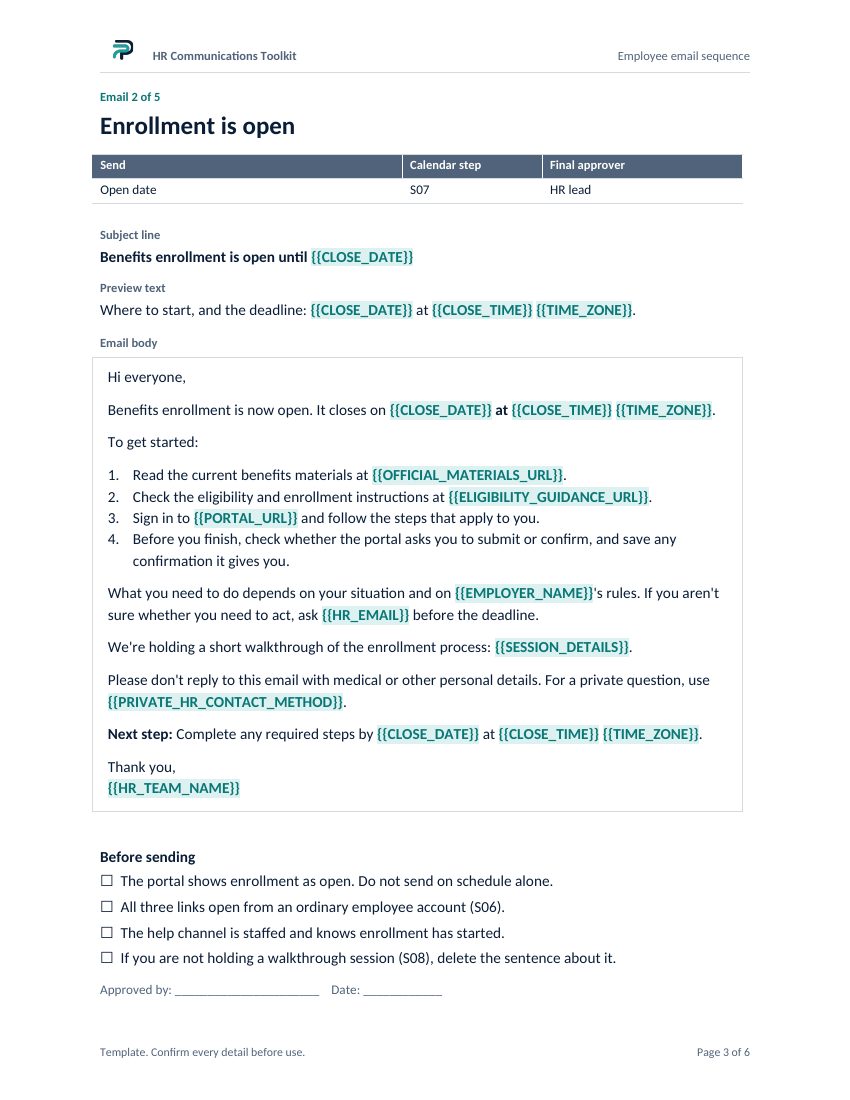
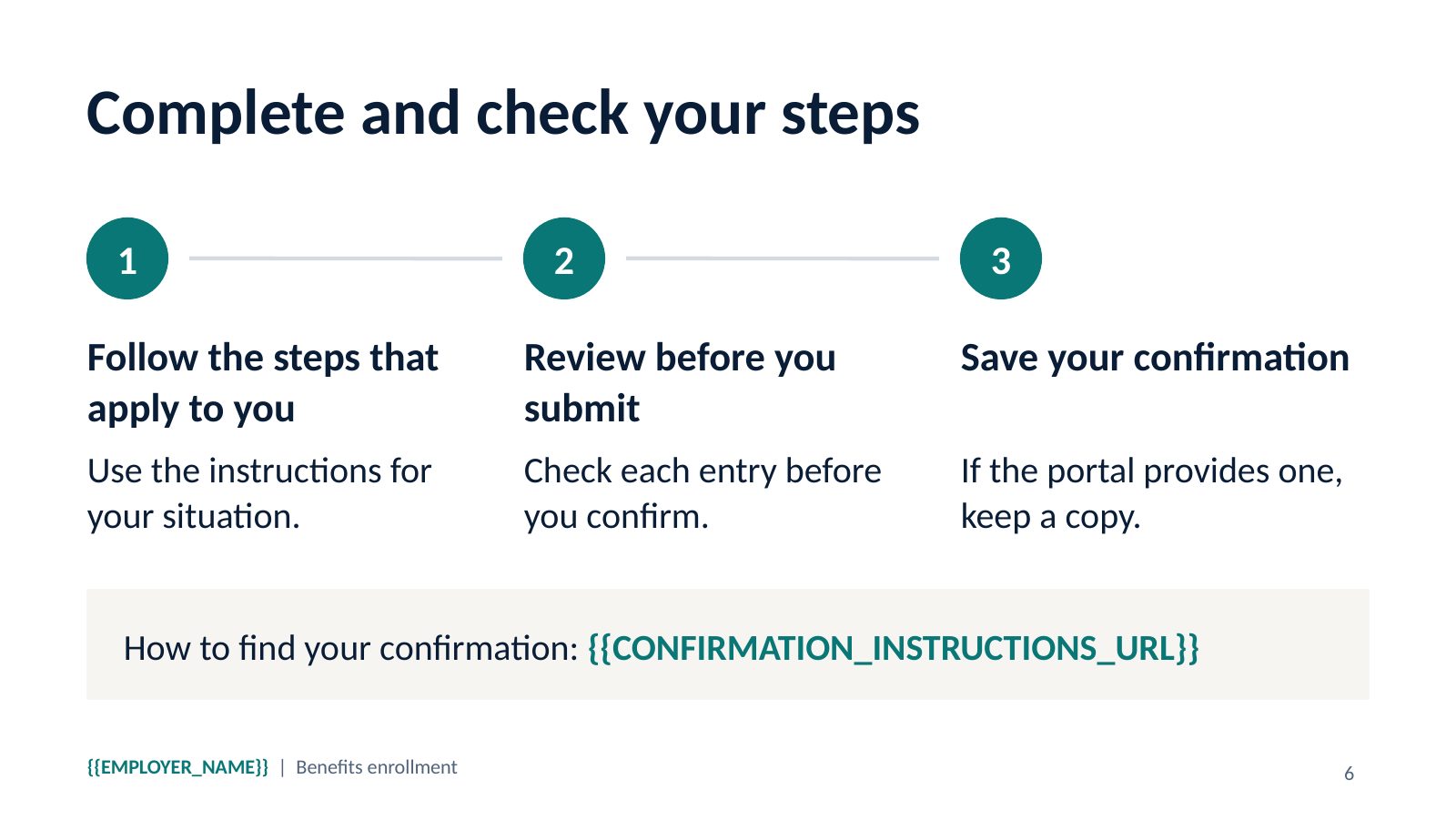 Pages from the actual files
The work doesn’t stop when enrollment opens.
And neither do the employee questions.
Another email. Another reminder.
Every enrollment update means more drafting, reviewing, and rewriting.
With Pravven: Five editable emails, ready to make your own.
One change. Five places to fix it.
A new deadline or enrollment link means checking every message.
With Pravven: Consistent placeholders and a shared fact sheet.
Less time for the people who need you.
Every hour spent preparing materials competes with helping employees.
With Pravven: A 14-step calendar and readiness checklist to keep work organized.
Everything you need to communicate open enrollment.
Five core resources, plus an optional AI companion. 10 files in one download.
Employee emails
Communicate each stage of enrollment.
Communication calendar
Organize key dates, owners and approvals.
Employee FAQ
Address common enrollment questions.
Presentation + flyer
Explain the process and share key dates.
HR preparation
Coordinate tasks, reviews and sign‑off.
AI Campaign Companion Optional
Adapt and check drafts using your own AI assistant.
Editable Word, Excel and PowerPoint resources. Preview samples before purchasing.
See the full file inventory
The Word, Excel and PowerPoint files open in Microsoft Office without special fonts or macros.
- Quick start guide
- Word. The order of work, a fact sheet listing every placeholder, and the roles to assign.
- Employee email sequence
- Word. Five emails: save the dates, enrollment open, halfway point, final reminder and enrollment closed. Each has a subject line, preview text, one next step and a short pre-send checklist.
- Communication calendar
- Excel. 14 steps with owner, fact verifier and final approver. Enter your open and close dates and suggested send dates fill in on working days, skipping the closures you list. Steps that don’t fit a short window are flagged for a decision, and your official open and close dates never move.
- Employee FAQ
- Word. 17 questions on dates, materials, the portal and getting help. Answers route employees to your official sources. HR review notes track who approved each answer.
- Orientation deck
- PowerPoint. Eight slides on the enrollment process, with presenter notes.
- Enrollment flyer
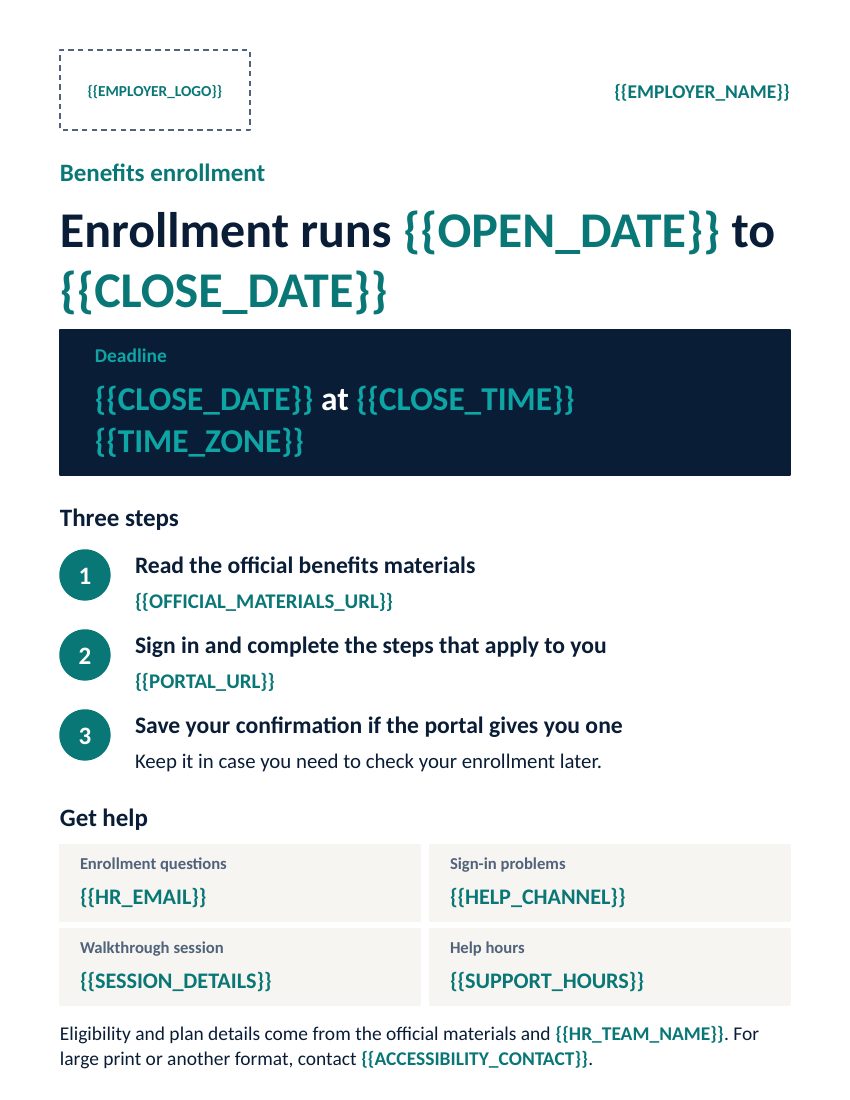
- PowerPoint, US Letter. One printable page for employees who rarely read work email.
- HR readiness checklist
- Word. Tasks from planning to close-out, each with an owner and a calendar step.
- Preview samples
- PDF. Preview pages of the kit.
- AI Campaign Companion guide
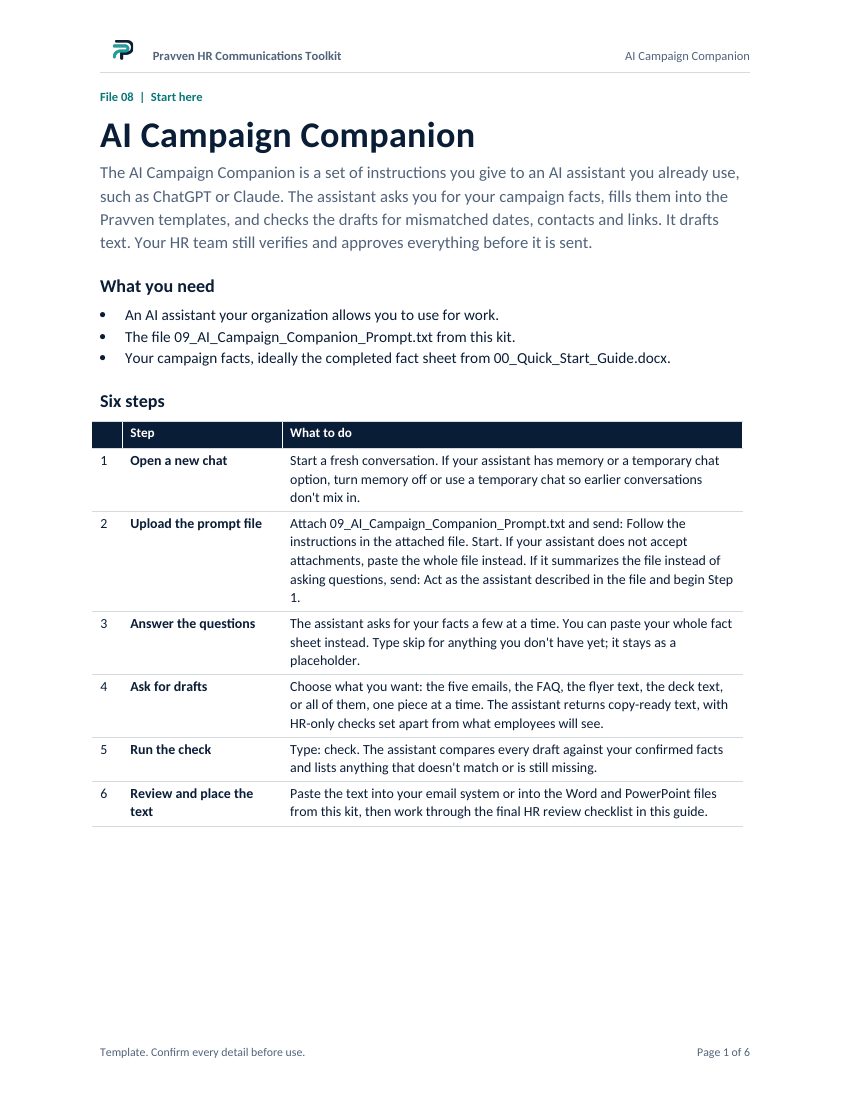
- Word. How to use the companion with ChatGPT, Claude or another AI assistant, and a final HR review checklist for every set of drafts.
- AI Campaign Companion prompt
- Plain text. Upload it to your assistant. It asks for the campaign facts you have checked, drafts from the Pravven templates, and checks the drafts for mismatched dates, contacts, links and missing details. It returns copy-ready text.
- License
- Text. One organization may edit the templates and share finished communications with its employees and benefits advisers. The templates may not be resold or redistributed.
See the actual files
Pages from the files you download. Highlighted text in braces marks the placeholders your team replaces with its own dates, links and contacts. Select a page to enlarge it.
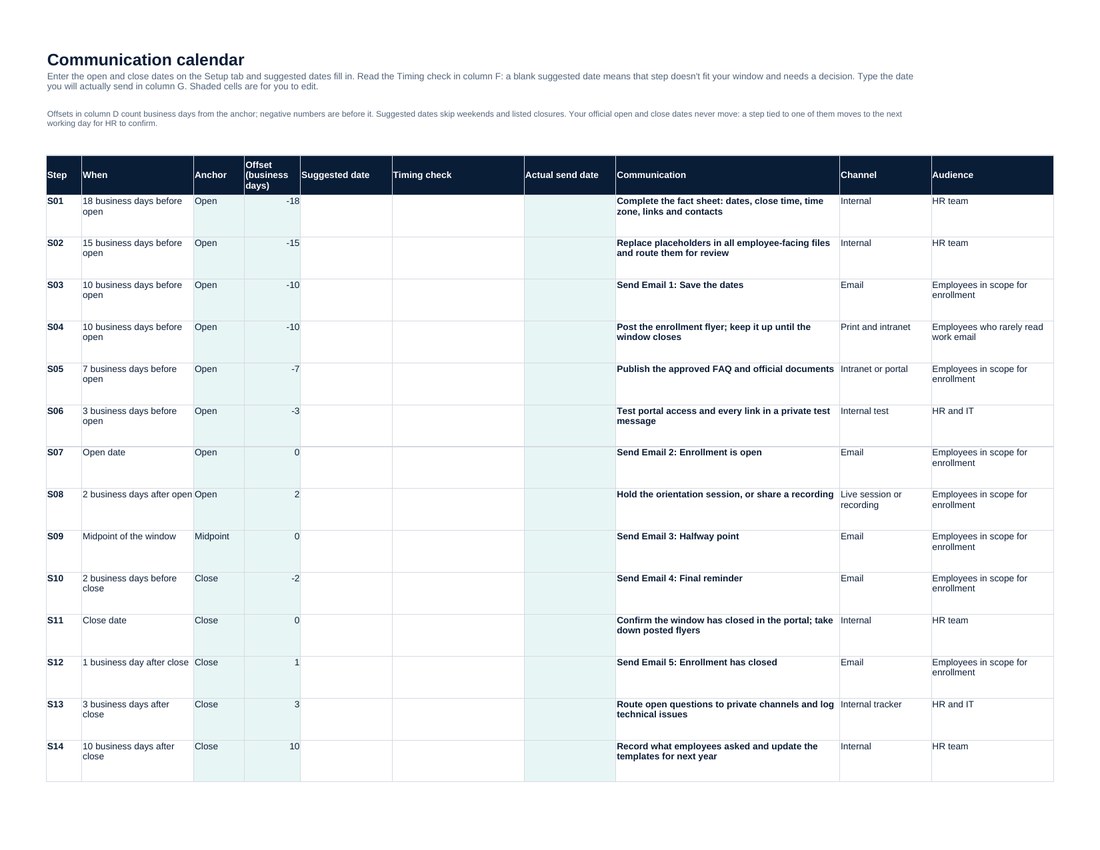
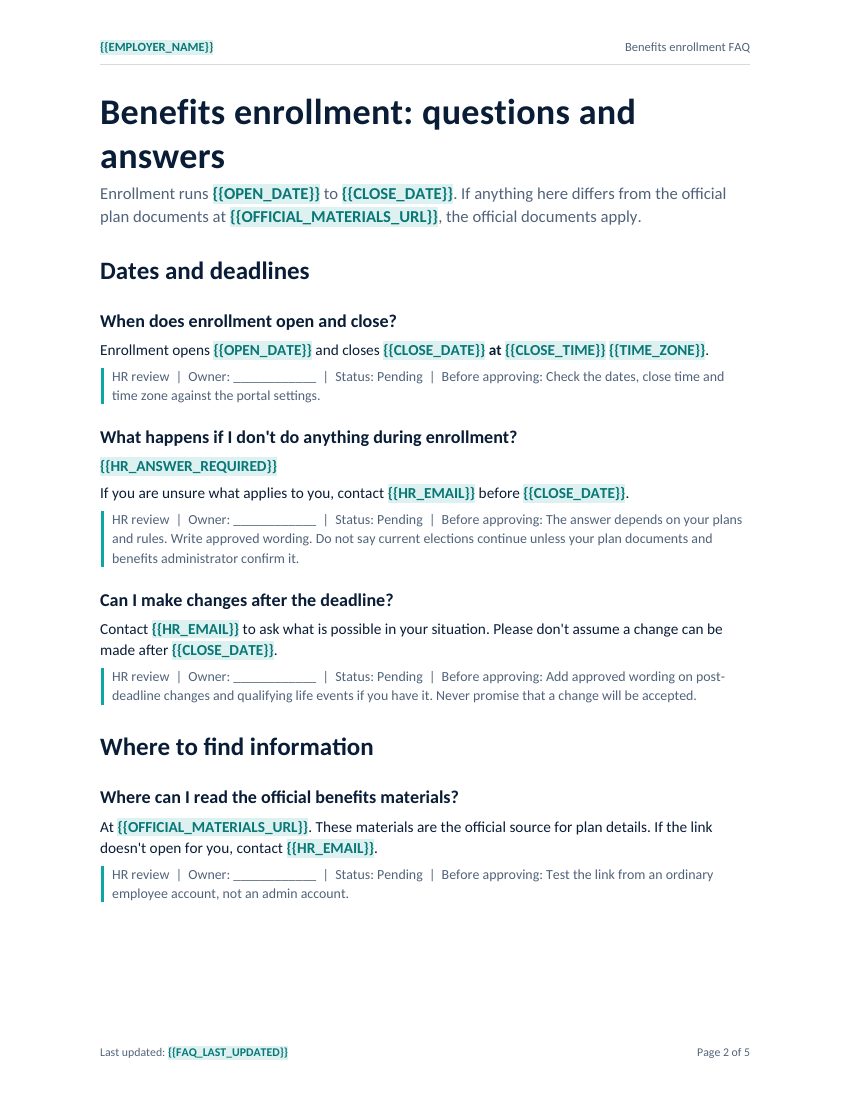
Try it with your own details, free
Enter your organization name, enrollment deadline and HR email to see one employee reminder from the toolkit. It runs in your browser, and nothing you type is sent to Pravven or stored.
$49 one-time for the full set of 10 files and a license.
Get the HR Toolkit, $49More than templates. A coordinated communication workflow.
Free templates usually arrive as separate documents, each with its own wording and dates. These files were written as one set, for one campaign.
ORGANIZED
One sequence, numbered
The calendar runs the campaign in 14 numbered steps. Each email and each checklist task points to its step, so everyone works in the same order.
EDITABLE
Your facts, your wording
Standard Word, Excel and PowerPoint files that share placeholder names such as {{CLOSE_DATE}}. Your team replaces them with your organization’s details and adjusts the wording.
CONTROLLED
Nothing goes out unapproved
Each step names an owner, a fact verifier and a final approver. The emails carry pre-send checks and the FAQ carries review notes. Your HR lead approves before anything reaches employees.
The files are not linked to each other. When a fact changes, your team updates each file, and the shared placeholder names make every instance easy to find.
How it works
STEP 1
Enter your enrollment facts
Fill in the fact sheet once with your approved dates, close time, contacts and portal links.
STEP 2
Customize your materials
Update the editable files yourself, or use the optional AI Campaign Companion to help with drafting.
STEP 3
Review and approve
Your benefits administrator checks the facts and your HR lead approves. The calendar records status for each step.
STEP 4
Deliver your campaign
Test every link from an employee account, then send and post through your organization’s own channels.
The toolkit does not send email or connect to your HR, payroll or enrollment systems.
Who it’s for
- Lean HR teams
- People Operations managers
- Benefits administrators
- Nonprofit operations teams
- Employers running open enrollment without dedicated communications support
Built for organizations of roughly 20 to 250 people. It covers the enrollment communication process. Plan details, eligibility rules and compliance obligations still come from your official documents and your advisers.
Why Pravven
Pravven is a benefits clarity company. It draws on professional experience in insurance and employee benefits, including benefits consulting, broker operations and the work of explaining complex coverage information to employees. The toolkit applies that experience to the part of open enrollment HR teams usually handle themselves: the communications.
Before release, the files went through scripted checks: every placeholder cross-checked across all files, calendar dates tested against short windows, weekends and holidays, and text contrast measured on every color pair.
Questions before you buy
What exactly do I receive?
One ZIP download with 10 files and a license: the quick start guide, email sequence, communication calendar, employee FAQ, orientation deck, enrollment flyer, HR readiness checklist, preview samples PDF, and the AI Campaign Companion guide and prompt. See the full inventory.
Are the files editable?
Yes. Every file is a standard Word, Excel or PowerPoint document. Fonts are Calibri and Arial.
Do I need special software?
You need software that opens Word (.docx), Excel (.xlsx) and PowerPoint (.pptx) files, such as Microsoft Office. There are no macros or special fonts. The samples are a PDF and the companion prompt is a plain text file.
Can I use the files for my entire organization?
Yes. One license covers one organization: one employer, including affiliates administered as part of the same centrally managed benefits program. Your employees and contractors may use it, and you may share finished communications with employees and benefits advisers. Brokers, consultants and PEOs need one license per client organization. See the Toolkit License.
Does it work with my benefits enrollment platform?
The files are independent templates with no integrations. You add your own portal links and instructions.
Do I need ChatGPT or Claude?
No. The templates work on their own. The companion is optional and works with an assistant your organization already allows. It never needs employee records or plan documents. Results vary by assistant.
Can the toolkit send emails automatically?
No. It does not send email or connect to any system. Your team sends each communication through its own email, intranet or print channels.
How is the download delivered?
Checkout and delivery are handled by Payhip. After payment you get a download page, and a receipt with a download link is sent to the email you used at checkout.
How do I buy it?
Select “Get the HR Toolkit, $49”. Checkout opens on Payhip. Sales tax is added at checkout where it applies. Available to buyers in the United States.
When can we buy it?
It isn’t on sale yet. Ask to be notified and we’ll email you when it is.
What is the refund policy?
Because the files are available immediately, a change of mind after download generally does not qualify for a refund. Contact us within 14 days of purchase if your order was duplicated, you were charged incorrectly, the product was materially different from its description, or the files can’t be opened. We offer a working replacement or troubleshooting where practical, and a refund where the problem can’t reasonably be fixed or the law requires it. See the Refund and Delivery Policy.
Are updates included?
Your purchase is the version described on this page, version 1.3.1. The license lets you keep it and reuse it for later enrollment periods of the same benefits program. No future versions have been announced.
Does it work for a short enrollment window?
Yes. The full suggested schedule needs about eight business days between your open and close dates. In a shorter window, the calendar leaves a step blank when it would fall too late to be useful, such as a final reminder after the deadline, and flags it so HR can schedule it by hand or skip it. Your actual enrollment dates never change, even when they fall on a weekend or holiday.
Is this insurance advice?
No. The toolkit covers the enrollment process: dates, where to find information, how to complete steps and who to ask. Plan details come from your official documents.
Important product information
What the toolkit does not do:
- It does not analyze, compare or recommend insurance plans.
- It does not determine who is eligible or what any employee needs to do.
- It does not send email, connect to payroll or enrollment systems, or collect employee data.
- It is not legal, tax, compliance or insurance advice, and it has not been reviewed by an attorney or regulator.
- The templates are not ready to send unchanged. Your organization replaces the placeholders and approves every communication.
- The AI Campaign Companion runs in your own AI assistant, under your organization’s policies. It drafts copy-ready text for you to paste. Some assistants can also make Office files; results vary. Its drafts need the same HR review as any other.
The HR Communications Toolkit provides general administrative communication templates. It is not legal, tax, compliance or insurance advice. Pravven is not a licensed insurance agency, broker or carrier. Your organization is responsible for the accuracy, timing, distribution, accessibility and privacy of every communication it sends.
Your next open enrollment campaign doesn’t have to start with a blank page.
Get the editable communication resources, coordinated calendar and review framework your HR team can adapt for its next enrollment campaign.
$49 One-time purchase, plus applicable sales tax
10 files and a license for one organization’s internal use. Available to buyers in the United States. Delivered by Payhip right after checkout.
Want an email when checkout opens? Ask to be notified.
Before you buy, read the Toolkit License, the Refund and Delivery Policy and the Terms of Use. Questions? Contact Pravven.